
Information for speakers
Upload your PowerPoint presentation in advance for accessibility reasons (update 27-05-2025)
PLEASE NOTE: this is an extra service for those who wish to view it in advance. Please bring your presentation to the speakers service centre, e.g. on a USB stick or on your laptop.
Steps to upload you presentation in the Dropbox:
- Please upload your presentation (.ppt) in the right folder (see links below per day, per round).
- Please name your file as follows: Presentation Title – Name of First Speaker
- Please do this before May 30th.
Monday June 2nd
- Keynotes - day 1
- Round 1: 11.00 - 11.45 - day 1
- Round 2: 12.00 - 12.45 - day 1
- Round 3: 14.15 - 15.00 - day 1
- Round 4: 15.15 - 16.00 - day 1
Tuesday June 3rd
- Keynotes - day 2
- Round 1: 11.00 - 11.45 - day 2
- Round 2: 12.00 - 12.45 - day 2
- Round 3: 14.15 - 15.00 - day 2
- Round 4: 15.15 - 16.00 - day 2
Wednesday June 4th
- Keynotes - day 3
- Round 1: 11.00 - 11.45 - day 3
- Round 2: 12.00 - 12.45 - day 3
- Round 3: 14.15 - 15.00 - day 3
- Round 4: 15.15 - 16.00 - day 3
Thank you very much in advance for your cooperation.
Practical information update 22 May 2025
General Information
- Do you have a question during the conference about giving your presentation? Please visit the Speakers Service Centre, located in the Atrium.
- On the website, you can check the programme in the timetables. You’ll also find which presentations are taking place in which halls or rooms. Please make sure to check in advance where your own presentation is scheduled, and where the Show & Tell presentations will be held.
- Can’t find your workshop or presentation listed for registration? Don’t worry, that just means it’s fully booked!
Submitting your PowerPoint at the Speakers Service Centre
Very important!
Are you using PowerPoint? Please bring your presentation (in 16:9 format) on a USB stick and submit it at the Speakers Service Centre well in advance. Any video files must be provided separately.
Make sure to do this on the morning of your presentation, at least one hour before your time slot. The organisation will then ensure your presentation is ready in the correct room.
Green room / dressing room
A dedicated lounge area is available for speakers.
Sending materials in advance
Would you like to send materials to the venue ahead of time? This is only possible on Friday 30 May or Monday 2 June between 12:00h and 17:00h. The venue can receive packages during these times only.
Updating your bio and presentation information
As of today (22 May) it is not possible anymore to change any presentation information in your dashboard. You can update your personal information in your dashboard until 31 May.
Important: Updating your bio is especially recommended for the keynote speakers!
Room facilities
- LCD screens and a laptop are available in the rooms for Oral Presentations and Interactive Workshops. They are not available for Table Talks or in the Show & Tell area.
- In both the Atriumzaal and the Kleine Zaal, a moderator will be present for all presentations. The moderator will welcome you as a speaker, help you get started with your presentation, introduce you, keep track of the time, and give you a 5-minute warning to wrap up.
Grote Zaal (Main Stage) speakers briefing
Keynote speakers and some Oral presentations will take place in the Grote Zaal (Main Stage). Please read the following briefing carefully:
Before Your Talk
- !!!ONLY FOR PRESENTERS IN THE GROTE ZAAL (MAIN STAGE)!!!: If you have a presentation in the Grote Zaal, please send your presentation in advance, no later than Wednesday 28 May, so we can load and test it in our system. Send your presentation to Helmi van Doorn: helmi@loe.tv
- Arrive 30 minutes before your scheduled slot at the Speakers Service Center in order go to the Grote Zaal in time. This gives our technical team and showcaller time to set up your audio, test your presentation, and walk you through the stage layout (entrance, screen, clicker, etc.).
- If your presentation uses a special font, please include the font file(s).
- All main stage presentations are run from our technical laptop.
- Bring a USB backup, even if you have already sent your presentation. Last-minute changes can be made in the video control room if needed.
- Please inform us in advance if your presentation includes:
- Video or audio files
- Internet links or live demos
- Interactive tools (Note: all interaction must use the Yellenge app; other tools like Mentimeter are not supported)
On Stage
- A clicker will be available.
- A timer (clock) and presenter screen will be provided on stage.
- You are responsible for keeping track of time. You’ll see the timer on your screen, and the moderator will give a 5-minute warning before your time is up.
- If you’re part of the opening or closing session, it’s especially important to arrive 30 minutes early. Once the plenary session begins, we cannot interrupt the programme for technical setup.
Information for Interactive Workshop speakers
Are you giving a workshop? Please check how many participants to expect, so you can bring enough materials.
If you’d like to temporarily store your materials before your session, this can be done in the Atriumzaal. Note: the hall is closed during sessions, so be sure to collect your materials on time.
Information for Oral Presentation speakers
Oral presentations are scheduled to last 20 minutes. However, on Wednesday, presentations in the Atrium Hall will last 15 minutes each.
Information for Table Talk speakers
Table Talks are an opportunity for anyone with a great idea that hasn’t taken off yet, a pressing question, or a new tactile reading project in need of feedback.To allow for meaningful conversations, each table accommodates 8 to 12 participants.
Every day from 14:15h to 16:00h, open Table Talks will take place. Anyone at the conference can sign up at the Information Desk to host one. Each session lasts 45 minutes.
Information for Show & Tell presenters
As an accessible alternative to a poster presentation, it’s important to bring as many physical products as possible to show.
Each Show & Tell spot includes an 80 x 80 cm table and a 1 metre wide by 2 metre high backdrop, on which you may hang materials.
For accessibility reasons, it is not permitted to place materials in front of or next to the table.
Important:
You may only set up your Show & Tell presentation on the day of your presentation. In the morning, you can place your items at the assigned table (at your own risk). Please also check in with the Show & Tell Team that morning (present in the Atrium).
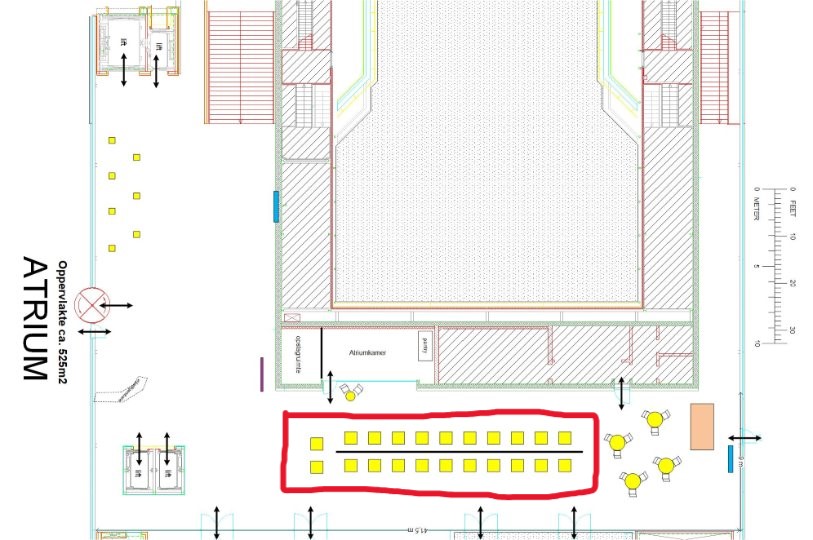
Map with location Show&Tell presentations
Map of the Atrium level of the Muziekgebouw with the Show&Tell location (in red square).
News update April
Speaker webinar
Last week we organized a speakers webinar. We gave practical information on the 4 types of sessions and tips on accessible presenting including explanations on how to convert your powerpoint presentation into an accessible pdf. In case you were not able to join, please find the link to the recording below. We encourage you to take some time to watch it, not because we think you are accessibility newbies, but because you can never be too aware!
Download the Powerpoint template Tactile reading
SAVE THE DATE!
We are very pleased that you making an important contribution to the Tactile Reading Conference. The date of the conference is fast approaching. It is now time to answer all your practical questions. That is why we will soon be organizing an online webinar.
During this webinar:
- we will answer almost all practical questions that speakers have;
- we will offer ample opportunity to ask individual questions;
- and we will provide you with useful tips on how to make your presentation accessible to everyone.
Save the date for this online webinar in your agenda now:
- Date: Thursday 17 April 2025
- Time: 4:00 PM - 5:30 PM CET
- Location: online; we will send you the link to participate a few days before 17 April.
We have set the time so that people from all parts of the world (from different time zones) have the best possible opportunity to attend this webinar. We hope to optimally support you in your preparations with this service and we look forward to a successful conference.
We know this moment is short notice but hope you can still attend. This is the only moment we are offering. If you can't attend, you will receive a link in a newsletter to re-watch the webinar afterwards.
Session Formats & Room Setup
We are still busy working out all the details, but the information below has been captured.
Oral Presentations (theater-style seating)
- Grote zaal/Main Hall – 430 seats
- Kleine zaal/Small Hall – 120 seats
- Atriumzaal/Atrium Hall – 90 seats (On Wednesday, sessions are 15 minutes instead of 20 due to scheduling)
- Duration: 20 minutes, including Q&A.
- Wednesday only: Sessions in the Atrium Hall will last 15 minutes, including Q&A.
Interactive Workshops (Cabaret-style seating)
- Studio 1 – 50 seats (10 tables of 5)
- Studio 2 – 35 seats (7 tables of 5)
- Studio 3 – 15 seats (3 tables of 5)
- Duration: 45 minutes
Table Talks
- Foyerdeck 2: 1 round table with 8 seats (1-2 presenters + 6-7 participants) and 1 round table with 12 seats (1-2 presenters + 10-11 participants)
- Foyerdeck 3: 1 round table with 8 seats (1-2 presenters + 6-7 participants)
- Duration: 45 minutes
- Additional information: No screen available, so PowerPoint presentations are not possible.
Show & Tell Presentations
- 22 standing tables (80x80 cm), each with one high stool. Additional seating area for longer discussions.
- Duration: Time: 13:15 - 16:00.
This extended time block allows visitors to explore all presentations. If you wish to attend another session, you may coordinate shifts with a colleague or leave your table temporarily.
Participant Registration for Sessions
To ensure a balanced distribution of attendees, participants must register in advance for oral presentations, interactive workshops, and table talks. Registration will open on May 8 at 08:00 CET (Central European Time).
Show & Tell presentations do not require registration—attendees can visit freely throughout the session.